Hotel Buffet Allergen Software: What to Look For (and What to Avoid)
Key Takeaways
- The most important software feature is update confirmation — the system must tell you when every label has received an allergen change, not just when the update was sent.
- DSGVO-compliant EU data storage is a procurement requirement for any software storing staff access logs in German or Swiss hotel groups.
- Software with direct POS integration eliminates manual menu entry — a critical error source when allergen data must be transcribed by hand.
- Require a live sandbox environment during vendor evaluation — test your actual allergen update workflow before committing.
The Three Functions That Must Connect
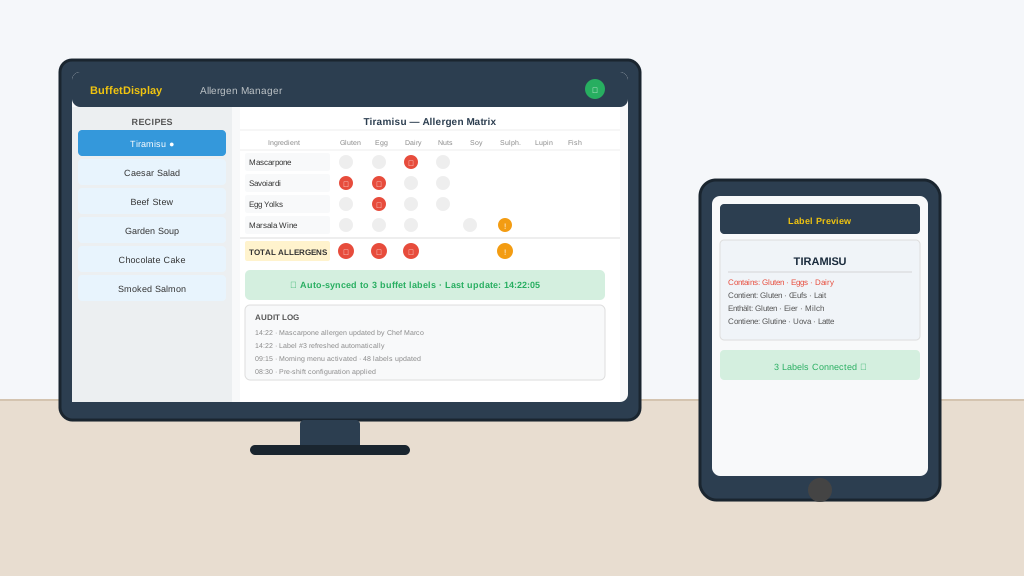
Allergen management in a hotel buffet requires three separate functions to work together: recipe management (storing which allergens are in each dish), label display (showing that information to guests at the point of food selection), and audit trail (proving what was shown, when, and that it matched what was actually served). Most systems on the market do one of these well. The critical question is whether all three connect seamlessly — because a gap between any two is a compliance gap.
Aus der Praxis / From the field
The F&B manager at a mid-size conference hotel in Hamburg described their selection process: they tested four platforms and ultimately chose based on one criterion above all others — could the software push an allergen update from a tablet in under 60 seconds, with confirmation that all labels had received the change? Two of the four failed that test.
The Recipe Management Layer
A recipe management system is where your chefs store the ingredients and sub-recipes for every dish. The allergen system should extract allergen status automatically from these ingredients — not require manual entry of allergens separately. If a chef must enter the allergens independently from the recipe, you have two records that can diverge. When a supplier changes an ingredient (which happens constantly), only the recipe record needs to update, and the allergen status should cascade automatically to every label.
Get the complete ROI calculator for your property
Enter your email and hotel name — we'll send the full cost-vs-paper breakdown with real numbers from comparable properties, plus a demo invite with no obligation.
No spam. Unsubscribe anytime. Your info is never shared.
Red Flags When Evaluating Allergen Software
Separate allergen entry
If the system requires you to enter allergens independently from the recipe, the two will inevitably fall out of sync
Manual label updates
If a recipe change requires a separate manual step to update labels, someone will forget it during a busy service
No audit trail
Without a timestamped log of what each label showed and when, you cannot prove compliance during an inspection
Cloud-only architecture
If the system requires internet to function and your connection drops, labels go blank or show stale data — both are compliance failures
The EU 14 Allergens: What "Complete" Coverage Means
EU Regulation 1169/2011 requires declaration of 14 allergens: gluten (from wheat, rye, barley, oats), crustaceans, eggs, fish, peanuts, soybeans, milk, tree nuts (almond, hazelnut, walnut, cashew, pecan, Brazil nut, pistachio, macadamia), celery, mustard, sesame, sulphur dioxide and sulphites, lupin, and molluscs. Your software must handle each of these individually — "contains nuts" without specifying which nuts is not sufficient under the regulation.
What the Audit Trail Must Capture
When a food safety inspector reviews your allergen records, they want to see: what was displayed on each label at a specific time, who authorized the information on that label, when the label was last updated, and whether the displayed information matched the recipe in your kitchen system. A PDF printout from this morning does not satisfy an inspector who wants to know what was shown during yesterday's lunch service. Your system needs a searchable, timestamped log that answers these questions without manual reconstruction.
Integration With Your Existing Kitchen Systems
For more information, see our hotel breakfast buffet display solution.
"We had three separate systems — a recipe database, an allergen checker, and the label software — and they were all out of sync by the time the inspector arrived. We have since moved to an integrated system and our first inspection under it was the cleanest we have ever had."
— F&B Director, 5-star resort in Mallorca
Integration Requirements: What the Software Must Connect To
Recipe management / POS integration. The allergen database should draw from the same recipe records used for costing and ordering. When a chef updates a recipe in the kitchen management system, allergen flags should update automatically. Standalone allergen input that requires separate data entry doubles the work and doubles the error risk.
Supplier specification import. Allergen data originates from supplier technical data sheets. Software that can import allergen data directly from supplier-provided spreadsheets or via EDI eliminates the manual transcription step where most allergen errors occur. Even import-via-CSV from a standard template is significantly safer than manual entry.
Display output integration. Allergen software should connect directly to digital buffet labels, digital menu boards, and guest-facing platforms. If the allergen management system requires a separate step to export and re-import into the display system, the chain of custody for allergen data is broken and synchronization errors become likely over time.
Reporting and audit export. Regulatory inspection may require production of allergen records for a specific date and time. The software should support export of historical label states in a format accepted by your national food authority — typically CSV or PDF with timestamps.
The Evaluation Checklist: 8 Criteria Before You Buy
1. Does it cover all 14 EU allergens natively? Some older systems were built for US market requirements (top-8 allergens). EU/UK compliance requires all 14. Confirm the full list is supported before evaluating any other feature.
2. Can it display precautionary allergen statements? "May contain traces of..." statements are required in some jurisdictions and preferred in others. The system should support these in addition to declared allergens.
3. Does it produce a timestamped audit log? Every allergen change should be logged with timestamp, user identity, old value, and new value. This log must be exportable. This is the most critical feature for regulatory defense.
4. Is the allergen data separable from menu data? Menus change frequently; allergen data should only change when the recipe actually changes. Systems that couple these too tightly create unnecessary allergen review burden for routine menu updates.
5. Can it handle ingredient-level allergen declarations? Some dishes carry allergens through components rather than primary ingredients. The system should support allergen flags at ingredient level, not just dish level, so component changes automatically propagate to affected dishes.
6. What does the training requirement look like? F&B staff turnover is high. Allergen software that requires more than 1 hour of training to use reliably will have compliance gaps caused by untrained users.
7. What is the vendor track record in food service? Generic allergen compliance software built for packaged food manufacturing does not transfer cleanly to buffet service. Ask for hotel or restaurant references specifically.
8. What is the incident response process? If a guest reports an allergic reaction and you need historical allergen display data within 24 hours for a regulatory or legal process, what is the vendor support path? This should be defined in the contract.
Related Resources
Frequently Asked Questions
Quellen / Sources
- 1.EU-Verordnung Nr. 1169/2011 (LMIV)(EUR-Lex)
- 2.BVL Leitfaden Allergenkennzeichnung(BVL)
- 3.hotelleriesuisse Lebensmittelkennzeichnung(hotelleriesuisse)
See How Integration Works in Practice
Book a demo to see how recipe management, allergen display, and audit trail work as one connected system.
Frequently Asked Questions
What features should hotel buffet allergen software have?
Essential features include: support for all 14 EU allergens with icon display, ingredient-level allergen tagging (not just dish-level), audit trail logging every update with timestamp and user, multi-language output, real-time push to display devices, and the ability to flag allergen changes before they go live to catch errors.
Does hotel allergen software need to integrate with the kitchen management system?
Integration is highly recommended but not always required. Systems that pull allergen data directly from the recipe database eliminate the risk of manual transcription errors. Without integration, staff must re-enter allergen data in two systems, creating a divergence risk. Native integrations or open API support are the key features to evaluate.
How does allergen management software reduce liability for hotels?
Allergen software creates a verifiable audit trail showing what allergen information was displayed on each label at any given time. This documentation is critical in the event of an allergen incident: it demonstrates due diligence and shows that correct information was provided. Manual paper labels provide no equivalent audit trail.
Is there allergen labeling software specifically for buffets (not just restaurants)?
Yes. BuffetDisplay is designed specifically for buffet allergen management, with features not found in restaurant-focused systems: label scheduling by meal period, bulk updates across all buffet stations simultaneously, QR code menus with full ingredient detail, and e-ink display integration for physical label replacement.
Related Articles
How to Set Up an Allergen Compliance System for Your Hotel Buffet
A 7-step guide for hotel F&B teams implementing an allergen compliance system from scratch: baseline audit, data source selection, display system choice, database configuration, change management, staff training, and go-live verification.
Read article →Electronic Buffet Labels for Hotels: The Complete Buyer's Guide
Everything F&B managers need to know before buying electronic buffet labels — from IP ratings and <a href="/blog/eu-allergen-labeling-requirements-hotels-2026" class="text-blue-600 hover:underline">allergen compliance</a> to TCO, supplier red flags, and integration with kitchen systems.
Read article →EU Allergen Labeling Requirements for Hotels in 2026
A practical guide to current EU food allergen regulations for hotels, what inspectors actually check, and how digital labels make compliance effortless.
Read article →