Buffet Label POS Integration: Oracle MICROS Simphony and Beyond
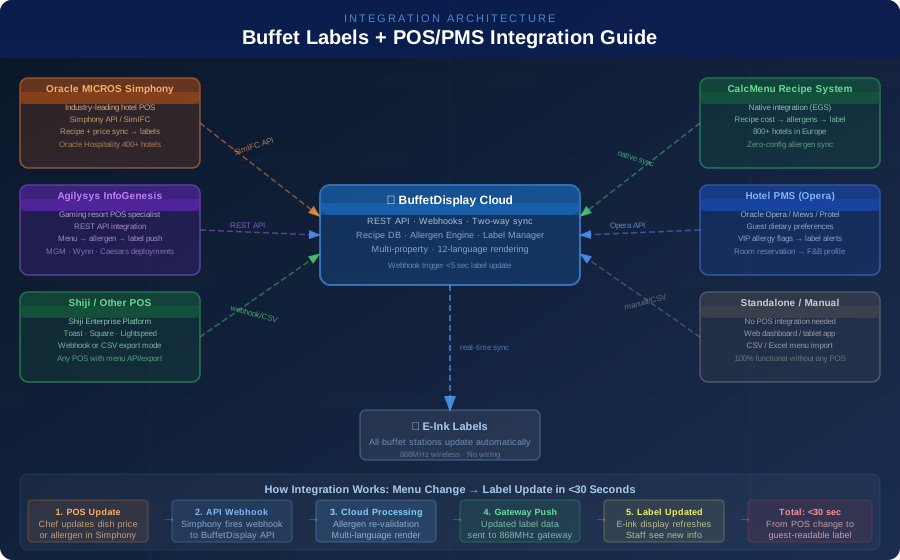
When a hotel chef changes a dish's sauce recipe — and that change adds a new allergen — how quickly does that information reach the guest at the buffet station? In most hotels, the answer is: it doesn't, until someone manually updates the buffet label. A kitchen manager changes the dish in the POS, someone has to notice, update the label separately, reprint or re-configure the display, and physically replace it. This gap between POS data and buffet label is where allergen incidents happen. POS integration with BuffetDisplay closes that gap: a change in Oracle MICROS Simphony propagates to all buffet labels within 30 seconds, automatically.
What Data Flows Between POS and Buffet Labels
A hotel POS system like Oracle MICROS Simphony or Agilysys InfoGenesis is the master record for several types of information that should be reflected on buffet labels. Understanding what data flows — and in which direction — clarifies what integration achieves:
Data flowing FROM POS TO BuffetDisplay labels:
- Dish/menu item names — the canonical name of each dish as it appears in the POS
- Prices — per-item or per-person pricing for à la carte or buffet pricing display
- Item availability — whether a dish is currently active or 86'd
- Menu period — which items appear at breakfast vs. lunch vs. dinner
- Recipe linkage — if the POS is connected to a recipe/costing system (like CalcMenu), the full ingredient list flows through
Data flowing FROM BuffetDisplay TO labels (allergen layer):
- Allergen flags — which of the 14 EU FIC allergens (or FDA Big 9) are present
- Dietary badges — vegetarian, vegan, halal, kosher, gluten-free
- Multi-language names — dish name in all configured languages
- Freshness timestamps — "prepared at 11:00" timestamps for HACCP documentation
What BuffetDisplay adds on top of POS data:
The POS typically stores allergen data in a basic "contains/may contain" format, or not at all. BuffetDisplay's allergen engine validates and enriches the allergen data from the recipe level. If a dish's sauce recipe (from CalcMenu) contains sesame oil, the allergen engine automatically flags SESAME on the label — without the chef or F&B manager having to manually check or update the allergen declaration.
The integration principle: POS is the master for operational data (price, availability, menu period). BuffetDisplay is the master for allergen and dietary data. The integration sync brings them together on a single label that shows both.
Oracle MICROS Simphony Integration
Oracle MICROS Simphony is the dominant POS platform in full-service and luxury hospitality worldwide, with over 30,000 hotel deployments. Simphony integration with BuffetDisplay uses the Simphony API (SimIFC) — Oracle's integration framework for third-party applications.
Integration architecture:
- Simphony API connection: BuffetDisplay registers as a Simphony extension application. The integration uses OAuth 2.0 authentication with the Simphony Cloud API.
- Menu sync: When a menu item is updated in Simphony (name change, price change, active/inactive status), Simphony fires a webhook notification to BuffetDisplay's API endpoint.
- Real-time update: BuffetDisplay receives the webhook, processes the change through its allergen engine, re-renders the label in all configured languages, and pushes the update to the label gateway for wireless transmission to the e-ink display.
- Bidirectional sync: For allergen data that doesn't exist in Simphony, BuffetDisplay pushes allergen declaration data back to Simphony's custom fields for regulatory documentation purposes.
What syncs automatically with Simphony:
- Menu item names (all languages if configured in Simphony)
- Current price (for properties that display pricing on buffet labels)
- Item active/inactive status (86'd items automatically disappear from labels or show "unavailable")
- Menu period assignment (which items appear at which meal service)
- Course/category assignment
Simphony-specific implementation notes:
- The integration requires Simphony Cloud (versions 19.1+). On-premise Simphony requires a middleware agent.
- Property-level vs. enterprise-level sync: for hotel chains, enterprise Simphony connects the entire chain's menu library to BuffetDisplay, allowing corporate F&B standards to propagate to all properties.
- Guest check integration: for hotels that want to show "added to your check" confirmation on the label after a guest taps their room key, Simphony check data flows to the label in real time.
Timeline for implementation:
A typical Simphony + BuffetDisplay integration takes 3–5 business days for a single property: API credentials and firewall configuration (Day 1), menu mapping and initial sync (Days 2-3), allergen layer configuration and testing (Day 4), staff training and go-live (Day 5).
Agilysys InfoGenesis Integration
Agilysys InfoGenesis is the POS system of choice for gaming resorts and high-volume food service operations in the US, including MGM Resorts, Wynn, Caesars Entertainment, and tribal gaming properties. InfoGenesis is particularly common in casino buffet environments, making the Agilysys-BuffetDisplay integration highly relevant for the casino hospitality segment.
Integration architecture:
Agilysys provides a REST API for InfoGenesis Cloud that BuffetDisplay connects to. The integration pattern:
- Menu pull: BuffetDisplay pulls the current active menu from InfoGenesis via API at configurable intervals (every 15 minutes or on-demand).
- Change detection: The integration layer compares the pulled menu to the previously synced version, identifies changed items (price, name, active status, categorization).
- Allergen enrichment: Changed items pass through BuffetDisplay's allergen engine. For items with CalcMenu recipes linked, allergen data is derived from ingredients. For items without recipe links, the allergen configuration set by the F&B team in BuffetDisplay persists.
- Label push: Updated items are pushed to the 868MHz gateways at the affected buffet stations.
Casino buffet-specific capabilities with InfoGenesis:
- 24/7 menu operation: Casino buffets run continuously. The integration supports round-the-clock menu periods (late-night, breakfast, brunch, lunch, dinner) that transition automatically on schedule.
- Promotion pricing: InfoGenesis promotion prices (happy hour, comp prices, VIP pricing) can be selectively shown or hidden on buffet labels.
- Station-level menus: InfoGenesis supports station-level menu definitions (sushi station, carving station, dessert station). BuffetDisplay maps these to physical label locations.
On-premise vs. Cloud InfoGenesis:
Older casino InfoGenesis deployments may be on-premise (not InfoGenesis Cloud). These integrate via a local middleware agent that bridges the on-premise API to BuffetDisplay's cloud. Most major gaming resorts have migrated or are migrating to InfoGenesis Cloud.
CalcMenu Integration: Native Recipe-to-Label Allergen Sync
CalcMenu is EGS Enggist & Grandjean Software SA's recipe management and food costing platform, used by 800+ hotels across Europe. Because both CalcMenu and BuffetDisplay are EGS products, their integration is native — there is no API to configure, no webhooks to set up, and no data mapping exercise.
How CalcMenu integration works:
- Every dish in CalcMenu has a complete recipe with ingredients, quantities, preparation steps, allergen flags derived from ingredient-level data, and costing information.
- When a chef modifies a recipe in CalcMenu (adds an ingredient, changes a sauce, updates a component dish), the allergen engine recalculates the dish's allergen profile automatically based on ingredients.
- The recalculated allergen profile propagates to BuffetDisplay automatically. Within 5 seconds, the updated allergen information appears on the buffet label — without any human intervention.
Why recipe-level allergen data is more reliable than POS-level:
A POS system typically stores allergen data as manually entered flags — a field where someone checked "contains gluten" or "contains nuts." This is error-prone: a supplier changes an ingredient, the recipe changes, but the allergen flag in the POS is only updated if someone remembers to update it manually.
CalcMenu stores allergen data at the ingredient level. When an ingredient is marked as containing a specific allergen, every dish that uses that ingredient is automatically flagged. When a supplier changes their formulation (e.g., a sauce manufacturer adds a gluten-containing thickener), updating the ingredient record in CalcMenu propagates the allergen change through every recipe that uses that ingredient — and from there to every buffet label that shows those dishes.
What this means for allergen incident liability: The CalcMenu→BuffetDisplay allergen chain provides an auditable, time-stamped record of when every allergen change was made and confirmed on every buffet label. This audit trail is the documentation required under the UK's Natasha's Law, EU FIC regulation, and FDA food allergy laws for due diligence in allergen management.
For hotels already using CalcMenu: Adding BuffetDisplay activates label sync without any integration work. Contact your EGS account manager to enable the BuffetDisplay connection in your CalcMenu tenant.
Standalone Operation: BuffetDisplay Without POS Integration
Not every hotel needs or wants POS integration with their buffet labels. BuffetDisplay operates fully as a standalone system — no POS connection required. F&B staff manage the buffet dish library directly in the BuffetDisplay web dashboard or tablet app.
When standalone operation is the right choice:
- Small boutique hotels with simple, consistent menus that don't change frequently
- Properties without a modern POS API (legacy on-premise systems without webhook/API support)
- Quick deployment timelines where POS integration project management would delay go-live
- Properties evaluating the system before committing to full integration
Standalone capabilities:
- Full dish library management with allergen configuration
- Multilingual label rendering in up to 12 languages
- Pre-scheduled meal period transitions
- CSV/Excel menu import from any source
- Tablet app for floor staff to update labels from the buffet station
CSV import workflow:
For hotels with POS systems that don't support webhook/API integration but can export menu data, BuffetDisplay supports scheduled CSV import. A nightly export from the POS → an SFTP folder → automatic BuffetDisplay import updates the dish library. This gives the benefits of POS sync without requiring API integration work.
Upgrade path: A hotel can start with standalone operation and add POS integration when ready. The dish library and allergen configurations built in standalone mode remain intact when integration is added — the POS sync simply starts keeping certain fields (name, price, availability) in sync automatically while the allergen configuration remains managed in BuffetDisplay.
Quellen / Sources
- 1.EU-Verordnung Nr. 1169/2011 (LMIV)(EUR-Lex)
- 2.EFSA Lebensmittelallergene(EFSA)
Connect Your POS to BuffetDisplay
BuffetDisplay integrates with Oracle MICROS Simphony, Agilysys InfoGenesis, CalcMenu, Shiji, and any POS with a REST API or CSV export. Allergen data updates automatically when your menu changes — from POS change to guest-readable label in under 30 seconds.
Frequently Asked Questions
How does Oracle MICROS Simphony integrate with buffet display labels?
Oracle MICROS Simphony integrates with BuffetDisplay via the Simphony API (SimIFC) — Oracle's integration framework for third-party hospitality applications. BuffetDisplay registers as a Simphony extension application using OAuth 2.0 authentication. When a menu item is updated in Simphony (name change, price change, active/inactive status, menu period assignment), Simphony fires a webhook notification to BuffetDisplay's API endpoint. BuffetDisplay receives the webhook, processes the change through its allergen validation engine, re-renders the label in all configured languages, and pushes the update to the 868MHz wireless gateway for transmission to the e-ink display — all within 30 seconds. The integration supports both Simphony Cloud (versions 19.1+) and on-premise Simphony via a local middleware agent. For hotel chains using enterprise Simphony, the integration can propagate corporate menu standards across all properties simultaneously. What data syncs: dish names, pricing, availability (including 86'd items that automatically disappear from labels), menu period assignments, and course/category data.
Can buffet labels integrate with Agilysys InfoGenesis for casino F&B operations?
Yes — Agilysys InfoGenesis is specifically supported by BuffetDisplay via the InfoGenesis Cloud REST API. This makes the integration particularly relevant for casino resorts and gaming properties where Agilysys is the dominant POS platform (MGM Resorts, Wynn Resorts, Caesars Entertainment, and many tribal gaming properties all use InfoGenesis). The integration uses a pull-based architecture: BuffetDisplay queries the InfoGenesis API at configurable intervals or on webhook notification, detects changed menu items, enriches the changes with allergen data from the BuffetDisplay allergen engine, and pushes updated labels to the gateway. Casino-specific capabilities: 24/7 menu period transitions (late night, breakfast, brunch, lunch, dinner) that switch automatically on schedule, station-level menu mapping (sushi station, carving station, dessert station), and promotion pricing control (showing or hiding InfoGenesis promotional prices on labels). For older on-premise InfoGenesis deployments, a local middleware agent bridges the on-premise API to BuffetDisplay's cloud.
What is the advantage of CalcMenu integration for allergen accuracy on buffet labels?
CalcMenu (by EGS, the same company that makes BuffetDisplay) integration is the most accurate and automated path for allergen compliance because allergen data derives from the recipe ingredient level rather than from manually entered flags. In a POS-only approach, a chef sets allergen flags manually in the POS — "this dish contains gluten." If the supplier changes a sauce ingredient, those manual flags must be updated by a human who notices the change. With CalcMenu, every ingredient has its allergen profile. When a recipe is updated (new ingredient, changed supplier, modified quantity), CalcMenu's allergen engine automatically recalculates the dish's complete allergen profile and propagates the change to BuffetDisplay within 5 seconds — with zero human intervention. This cascade works across dishes: if a base stock that appears in 40 recipes changes its allergen profile, all 40 recipes and their corresponding buffet labels update automatically. The CalcMenu→BuffetDisplay integration also generates a time-stamped audit trail of every allergen change, which is required documentation under the UK's Natasha's Law, EU FIC regulations, and FDA food allergy labeling requirements.
Does BuffetDisplay work without any POS integration?
Yes — BuffetDisplay operates fully as a standalone system with no POS connection required. Hotels manage their dish library directly in the BuffetDisplay web dashboard or tablet app, configure allergens per dish, set up multilingual names and descriptions, and manage meal period schedules — all without connecting to a POS. Standalone mode is the right choice for boutique hotels with simple stable menus, properties with legacy POS systems without API capability, or any hotel wanting to deploy quickly without an integration project. For hotels with POS systems that can export but not push data, BuffetDisplay also supports scheduled CSV/Excel import: the POS exports a menu file nightly to an SFTP location, and BuffetDisplay automatically picks up the changes. The upgrade path is seamless — a hotel can start in standalone mode, build out their dish library and allergen configurations, and add POS integration later. All configurations built in standalone mode persist when integration is activated.
Related Articles
School Cafeteria Digital Food Labels: USDA NSLP and Smart Snacks Compliance
US school cafeterias serving the USDA National School Lunch Program must display accurate allergen information, meet Smart Snacks nutritional standards for a la carte items, and maintain HACCP documentation for state SNO reviews. Digital e-ink labels update automatically when recipes change — eliminating reprinting costs and the allergen errors that occur when nutrition staff turnover runs at 40-60% per year.
Read article →Military Dining Facility (DFAC) Digital Food Labels: DoD Allergen Compliance
US military dining facilities (DFACs) serve 12,000+ covers per day at major installations under 5 meal periods, managed by contractors including Sodexo Government Services, Aramark Federal, and KBR. Digital e-ink labels eliminate paper reprinting between meal periods, display FDA Big 9 allergens per the FASTER Act, and support multilingual labeling for OCONUS bases serving allied and host nation forces.
Read article →Golf Resort and Country Club Buffet Labels: Premium Dining, Discreet Compliance
Golf resorts and country clubs serve members and guests who expect premium culinary presentation and complete dietary transparency. Digital e-ink buffet labels match the aesthetic of premium clubhouse dining while delivering allergen compliance, seasonal menu rotation, and course-side refreshment labeling — all managed from a single dashboard.
Read article →